


Babysits - Find Babysitters
4.2153.00 Reviews
App Specs
- Version
- 10.1.0
- Updated On
- License
- Free
- Downloads
- 1,000,000+
- Developer
- Babysits
- Categories
- Parenting
- Platform
- Android, iOS
Screenshots
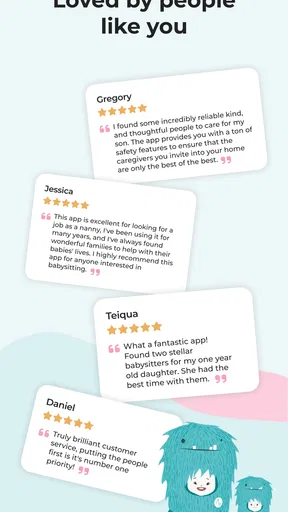
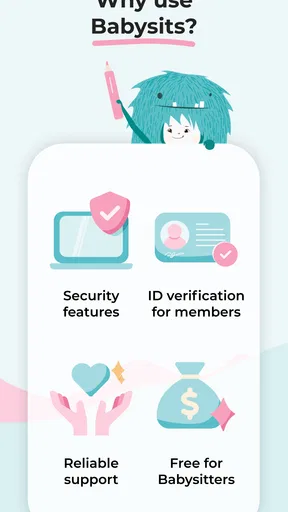
 Analysis by AppCompare
Finding childcare is rarely a task I want to squeeze into an already busy day. I’d rather compare a few suitable people, ask questions, and agree on a plan than rely on a rushed search when plans are changing. That is the problem Babysits - Find Babysitters aims to make easier: it gives parents a place to look for sitters and handle the early conversations. Its usefulness depends on more than a tidy interface, though. A good match still takes judgment, clear communication, and enough time to check that the arrangement feels right.
When the search depends on a connection
This is a connected service, so the moments that matter most—looking through sitter profiles, contacting someone, and sorting out an appointment—depend on being able to reach the app and the other person. I’d start a search while I have a reliable connection rather than wait until I’m already outside or dealing with a last-minute change. That gives me time to read profiles carefully and send a message that explains the actual need.
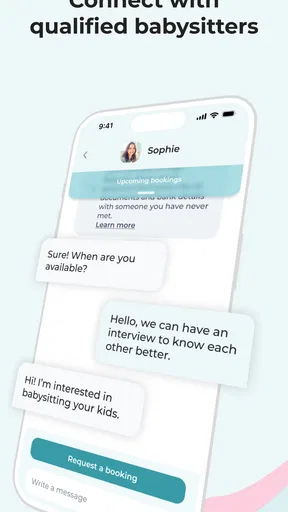
Messaging in one place is useful because it keeps the initial conversation together instead of scattering details across texts and calls. Still, a message sent is not the same as a confirmed booking. If the timing is tight, I would follow up through an appropriate channel and get a clear answer about the date, arrival time, and expectations before treating childcare as settled.
Using it around a family schedule
Babysits is a parenting app from Babysits, and its focus is straightforward: help families find and connect with sitters. The store summary points to searching and planning appointments, but the practical value is in how a parent uses that process. I would search with the real schedule in mind, then compare availability and relevant experience instead of choosing only by proximity or a quick first impression.
For example, imagine a parent whose work meeting has run late and who needs cover for a few hours later in the week. Rather than sending a vague request to everyone nearby, they can look for people whose availability fits, check the details in their profiles, and ask a small set of specific questions. That could include the children’s routine, whether dinner needs preparing, and how the sitter prefers to handle updates. The app can help organize the search; the parent still has to decide whether the answers inspire confidence.
I also find it sensible to use the app before an urgent need arises. A planned search leaves room to compare candidates, arrange a conversation, and discuss practical details without making a decision under pressure. For recurring care, I would treat the first meeting as a chance to see whether communication and expectations work in practice, not assume that a promising profile guarantees a lasting fit.
What to do when plans stall
Like any service that connects people, the process can pause if a sitter does not reply, availability changes, or a conversation leaves an important question unanswered. I would keep more than one suitable candidate in view when the need is important, and I would avoid making nonrefundable or hard-to-change plans around a sitter until we have agreed clearly. That is not a flaw unique to this app; it is the reality of arranging care with another person.
Worth Reading Before You Choose

Flipboard Shows What News Apps Must Do Beyond the Feed

Switching to Android Auto Means Rethinking Your Driving Routine

Google Calendar Makes a Crowded Week Easier to Manage

Ludo King Makes the Most of the Minutes Between Plans

Baby Panda World Brings Quick Play to Modern Phones, but Its Game Library Feels Busy

ESPN’s Live Game View Makes Following Close Games Easier
If a search is not producing a good match, refining the request is more useful than repeatedly sending the same message. State the hours, location, and key responsibilities plainly, then give the other person a reasonable chance to respond. For a same-day emergency, a trusted family contact or established local caregiver may be a better backup than depending on a new app-based conversation to move quickly.
Keeping use practical and data-conscious
Setting up a family profile can make searches more relevant, but I would share only the information needed to explain the care request. Details about a child’s routine can help a sitter understand the job; sensitive family information should be discussed thoughtfully and only when it is relevant. I’d also keep the first exchange focused on fit and logistics, saving private details for a conversation where there is a clear reason to share them.
Because profile browsing and communication rely on a working connection, I would note down confirmed arrangements in a way I can refer to when needed, rather than assuming every detail will be easy to retrieve at the exact moment I need it. A quick personal checklist—time, address, emergency contact, and agreed tasks—can reduce confusion on the day. That is especially helpful when more than one adult is coordinating pickup or household plans.
Babysits is free to download, with in-app purchases listed at different amounts, so I would check the current purchase details in the app before paying for anything. Its content rating is Everyone. It has an average rating of 4.0 from around eleven thousand ratings, and more than one million installs. Those figures suggest it has reached a broad audience, but they cannot tell me whether the available sitters in my own area will suit my family. Local availability and the quality of individual conversations matter more to the decision.
Getting Started with Babysits
Right off the bat, downloading and setting up Babysits - Find Babysitters was a breeze. Available on both Android and iOS, the app is designed to be user-friendly, so even if you’re not tech-savvy, you’ll find it pretty straightforward. After installation, you’re prompted to create a profile. Here, you can add all the necessary details about your family, your kids, and what exactly you’re looking for in a babysitter.
I was pleasantly surprised by the app's interface. It's clean, intuitive, and doesn’t bombard you with unnecessary features. Everything you need is right there at your fingertips, making navigation a piece of cake.
Finding the Perfect Babysitter
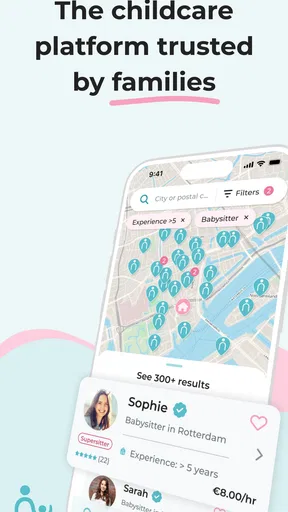
Once your profile is set up, the next step is searching for babysitters. The app offers a handy search bar where you can filter sitters based on location, availability, and even specific skills or languages. What I loved about this feature is the ability to see reviews and ratings from other parents. It’s like having a trusted community of fellow parents guiding your choice.
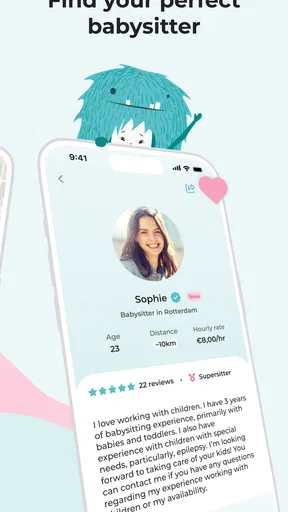
You can also view detailed profiles of sitters, complete with their experience, hourly rates, and a short bio. This transparency is super reassuring, especially when you’re leaving your little ones with someone new.
Connecting and Booking
After finding a few potential sitters, I sent out some messages through the app’s chat feature. It’s convenient and keeps all your communications in one place. The sitters were responsive, and I quickly found a match for our needs.
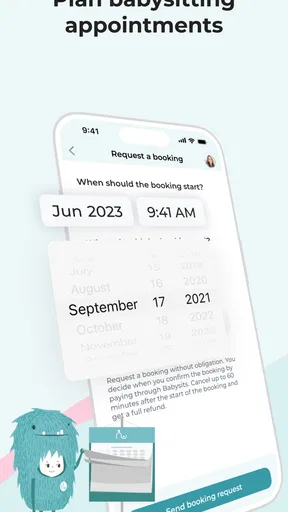
Booking a babysitter through the app is seamless. You can set the date, time, and even discuss any specific instructions directly with the sitter. I appreciated the calendar integration, which made it easy to keep track of upcoming bookings.
Trust and Safety
One of the standout features of Babysits is its commitment to safety. The app provides a checklist for parents and sitters to ensure that everyone is on the same page. Plus, there’s an option for sitters to upload a background check, which adds an extra layer of security. As a parent, knowing that these measures are in place provides peace of mind.
The community aspect of the app is also worth mentioning. Parents can connect with each other, share tips, and even recommend sitters. It feels like a supportive network rather than just a transactional platform.
Choosing it over familiar alternatives
Compared with asking friends for a referral, an app-based search can expose me to more candidates and make it easier to compare profiles in one sitting. A personal recommendation still has an advantage: someone I trust may already know how a sitter behaves in a real household. I would use the two approaches together when possible, rather than treating a profile or a referral as a substitute for my own conversation and decision.
Compared with calling an agency, the app’s appeal is the direct connection and the ability to explore profiles on my own schedule. The trade-off is that parents need to do more of the evaluating themselves. If I wanted a service to manage the matching process or provide a particular kind of formal support, I would first check whether a local agency offers what I need instead of assuming a marketplace does the same job.
It is also not the right fit for every childcare situation. Families looking for a licensed daycare place, a guaranteed emergency replacement, or a provider who handles all screening and administration may be better served by a different option. Babysits is most useful when I have enough time to compare people and take responsibility for confirming the details directly.
Making the first arrangement more useful
One practical way to improve the search is to separate must-haves from preferences before opening profiles. A required time window, location, or relevant experience should guide the shortlist; preferences can help distinguish between otherwise suitable candidates. This keeps me from getting distracted by polished bios while overlooking a schedule mismatch that would make the arrangement impractical.
For a first booking, I would send a concise message with the date, start and end time, children’s ages, and the main responsibilities. Then I’d ask one or two questions that reveal how the sitter approaches the specific situation, rather than relying on a generic “Are you available?” A clear request helps both sides decide whether to continue and reduces avoidable back-and-forth.
Before confirming, I would agree on practical points directly: how the children’s routine will be handled, who to contact if plans change, and what the parent expects at the end of the visit. The profile and any reviews can inform that conversation, but they do not replace it. I would also make sure another caregiver in the household knows the plan, particularly if they will be handing over the children.
The app’s current version is 9.1.6, and it requires Android 7.0 or later on Android. If I were installing it on an older device, I would check compatibility before relying on it for a time-sensitive search. Babysits was released on November 17, 2016, and its current version may differ as the app changes, so I would keep the app updated through the relevant store when I depend on it for ongoing conversations and scheduling.
Final Thoughts
After using Babysits - Find Babysitters, I can confidently say it’s a must-have for any parent juggling a busy schedule. It simplifies the process of finding a reliable babysitter, making it less of a chore and more of a quick, efficient task.
The app’s user-friendly design, comprehensive sitter profiles, and emphasis on community and safety make it stand out in the sea of babysitting apps. Whether you need a sitter for a few hours or are looking to establish a long-term relationship, Babysits has you covered.
So, if you’re in need of some child-free time or just want to ensure your kids are in good hands, give Babysits a try. It might just become your new favorite parenting tool.
My connectivity verdict
I see the strongest case for Babysits when I can use it as a planning and comparison tool, not as a promise that childcare will materialize instantly. A reliable connection makes it easier to search, message, and coordinate, but the decisive work remains human: checking fit, agreeing on expectations, and keeping a sensible backup for urgent changes.
If you want to find and contact sitters yourself, and you are comfortable making the final judgment, it is a practical option to explore. If you need care immediately, want someone else to manage vetting, or cannot afford a delay while waiting for replies, I would choose a more dependable arrangement first and use the app for future planning. That balance is what makes it useful without asking it to do more than a connection service can.
Pros
- User-friendly interface for easy navigation.
- Comprehensive profiles with user reviews.
- Secure messaging to communicate with sitters.
- Wide selection of babysitters available locally.
- Flexible booking options to suit any schedule.
Cons
- Limited free features without subscription.
- Some profiles lack detailed information.
- Occasional app crashes reported by users.
- Not all regions have a large sitter pool.
- Verification process can be time-consuming.
FAQs for Babysits - Find Babysitters
What features does Babysits offer to parents?
Babysits provides a comprehensive platform for parents to connect with local babysitters. The app features a detailed search function, allowing parents to filter by location, experience, and availability. Profiles include reviews and ratings from other parents, ensuring you find a trustworthy sitter. Additionally, the app facilitates secure communication and booking directly through its interface.
Is Babysits safe for both babysitters and parents?
Safety is a top priority for Babysits. The platform includes user reviews, ratings, and ID verification to enhance trust. Parents and babysitters can communicate through secure messaging. Babysits also offers community guidelines and safety tips to ensure a safe and positive experience for all users. It's recommended that users conduct interviews and background checks as an added precaution.
How much does it cost to use Babysits?
Babysits offers a free version with basic features, allowing users to browse profiles and send messages. For enhanced features like unlimited messaging and viewing contact details, a premium subscription is available. This premium service is offered at a competitive monthly rate, providing greater flexibility and access to the full suite of tools for both parents and babysitters.
Can babysitters find jobs through Babysits easily?
Yes, Babysits is designed to help babysitters find jobs with ease. Sitters can create detailed profiles highlighting their experience, availability, and preferences. The platform allows sitters to search for job postings and apply directly through the app. With a robust community and regular job listings, finding babysitting opportunities is both efficient and user-friendly.
What should I consider before downloading Babysits?
Before downloading Babysits, consider your specific needs, such as the frequency of babysitting services required and the importance of sitter reviews. Evaluate the cost of premium features if you need enhanced access. Ensure the app is available in your region and compatible with your device. Lastly, review the app's privacy policy and terms of service to understand data handling and user agreements.


